





MacBook Pro vs. MacBook Air
Table Of Content
The Ultimate 2025 Spec Comparison — Which MacBook Is Really Worth Your Money?
M4 Chip · Display · Battery · Ports · Performance · Price · Verdict
Introduction
Every year, millions of Americans walk into an Apple Store or open apple.com and face the same question: MacBook Air or MacBook Pro? Both are stunning machines. Both run Apple Silicon. Both will outlast most Windows laptops. But they are not the same — and choosing the wrong one could mean wasting hundreds, or even thousands, of dollars.
In 2025, Apple refreshed both lineups with the M4 chip family. The MacBook Air now starts at $999 with M4 power that would have seemed unthinkable five years ago. The MacBook Pro starts at $1,599 and goes all the way up to $7,000+ with the M4 Max chip. The gap in price is real. The gap in performance is real. But the question is: does that gap matter for you?
This article breaks down every major spec — chip, display, battery, ports, cooling, speakers, design, and price — in plain American English. No jargon overload, no filler. Just the facts you need to make the smartest buying decision in 2025.
Concept Matrix: Air vs. Pro at a Glance
Before diving deep, here is a high-level overview of how the two laptops compare across the key categories — main idea, explanation, best-use examples, and key terms:
| Category | MacBook Air M4 | MacBook Pro M4 |
| Main Idea | The world’s best everyday laptop — ultra-thin, silent, and powerful enough for most tasks | Professional powerhouse with pro-grade display, active cooling, and a full port suite |
| Explanation | Built for everyday users: students, writers, remote workers, and casual creatives. The fanless design keeps it whisper-quiet at all times. | Built for power users: video editors, developers, music producers, and data scientists who push their hardware to the limit. |
| Best Example Use | Zoom calls, browsing, writing, 4K video editing (short clips), coding, light design work | Final Cut Pro 8K edits, Xcode builds, Logic Pro sessions, 3D rendering, machine learning |
| Key Terms | fanless, Liquid Retina, MagSafe, M4 chip, portability, battery efficiency | Mini-LED, ProMotion 120Hz, active cooling, M4 Pro, M4 Max, Thunderbolt 5, HDR |
Full Spec-by-Spec Comparison (2025 Models)
The table below covers every major technical specification side by side. All data is based on Apple’s current lineup featuring the M4, M4 Pro, and M4 Max chips:
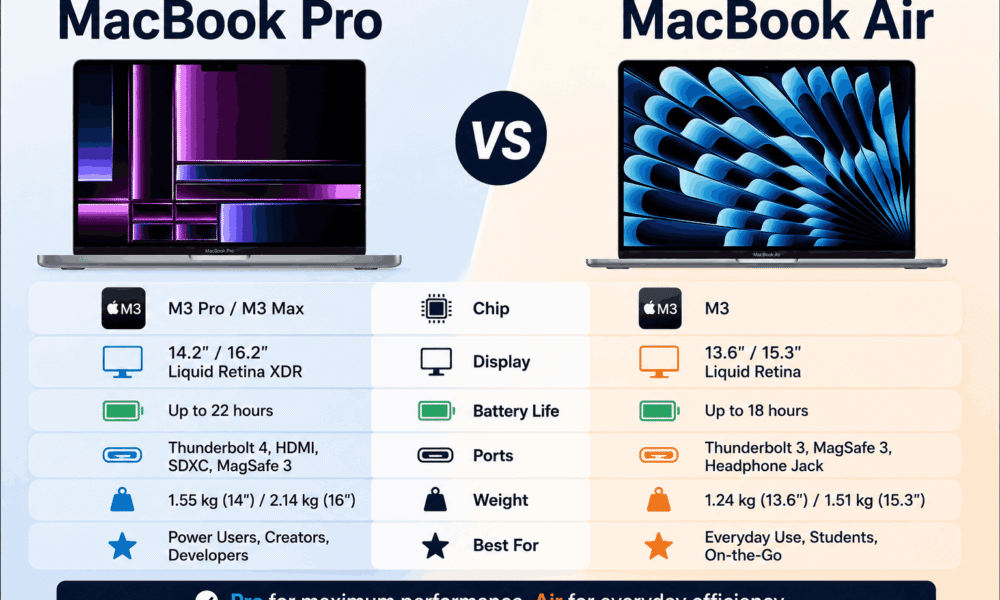
| Spec | MacBook Air M4 | MacBook Pro M4/M4 Pro |
| Starting Price | $999 (13-in) / $1,199 (15-in) | $1,599 (14-in M4) / $2,499 (16-in M4 Pro) |
| Chip Options | Apple M4 only | M4, M4 Pro, or M4 Max |
| CPU Cores | 10 CPU cores (all configs) | 10 (M4) / 14 (M4 Pro) / 16 (M4 Max) |
| GPU Cores | 8-core (13-in) / 10-core (15-in) | 10 (M4) / 20 (M4 Pro) / 32 (M4 Max) |
| Display Size | 13.6-in or 15.3-in Liquid Retina | 14.2-in or 16.2-in Liquid Retina XDR |
| Display Tech | IPS LCD, 60Hz, up to 500 nits | Mini-LED, ProMotion 120Hz, up to 1,000 nits |
| Base RAM | 16GB unified memory | 16GB (M4) / 24GB (M4 Pro) unified memory |
| Max RAM | 32GB | 32GB (M4) / 64GB (M4 Pro) / 128GB (M4 Max) |
| Base Storage | 256GB SSD | 512GB SSD |
| Max Storage | 2TB SSD | 8TB SSD (M4 Max) |
| Battery Life | Up to 18 hours (tested 15–18 hrs) | Up to 22 hours (tested 20–22 hrs) |
| Cooling | Fanless (passive cooling) | Active fan cooling system |
| Ports | MagSafe 3 + 2x Thunderbolt/USB-C + headphone jack | MagSafe 3 + 3x Thunderbolt + HDMI 2.1 + SD card slot + headphone jack |
| Speakers | Stereo 2-speaker system | 6-speaker system with force-canceling woofers |
| Webcam | 12MP Center Stage camera | 12MP Center Stage camera |
| Weight | 2.7 lb (13-in) / 3.3 lb (15-in) | 3.4–3.6 lb (14-in) / 4.7 lb (16-in) |
| Thickness | 0.44–0.45 inches | 0.61 inches (14-in) / 0.66 inches (16-in) |
| Colors | Silver, Starlight, Midnight, Sky Blue | Silver, Space Black |
| External Displays | Up to 2 external displays | Up to 3–4 external displays (M4 Max) |
Chip & Performance: The Engine Under the Hood
MacBook Air M4
The MacBook Air comes exclusively with the base M4 chip — and honestly, that is not a limitation for most people. The M4 packs a 10-core CPU, paired with an 8-core GPU on the 13-inch model and a 10-core GPU on the 15-inch. Real-world performance is jaw-dropping for everyday tasks. Opening 40 browser tabs, running Zoom while editing in Lightroom, and exporting a 4K video simultaneously barely makes the Air flinch.
What the Air cannot do is sustain heavy workloads for long periods. Because it is fanless, the M4 chip will throttle (slow itself down) to avoid overheating when under prolonged stress — think hour-long Blender renders or massive Xcode compilations.
MacBook Pro M4 / M4 Pro / M4 Max
The MacBook Pro is where things get serious. The base 14-inch starts with the same M4 chip as the Air, but its active cooling system means it never throttles — it sustains peak performance indefinitely. Step up to the M4 Pro (14 CPU cores, 20 GPU cores) or the monstrous M4 Max (16 CPU cores, 40 GPU cores, 128GB RAM ceiling) and you are in a completely different performance class. Professional video editors rendering 8K footage in Final Cut Pro, machine learning engineers training models locally, and audio producers running 200-track Logic Pro sessions — this is the Pro’s territory.
Display: The Biggest Visible Difference
This is arguably where your $500+ premium for the MacBook Pro is most felt every single day.
MacBook Air — Liquid Retina (IPS LCD)
The Air’s display is genuinely excellent. At 2560×1664 resolution (13-inch) with True Tone and P3 wide color, it is sharper and more colorful than most PC competitors. However, it tops out at 500 nits of peak brightness, uses a 60Hz refresh rate, and lacks HDR support. For most users — spreadsheets, video calls, web browsing, watching Netflix — this display is more than enough.
MacBook Pro — Liquid Retina XDR (Mini-LED)
The Pro’s Liquid Retina XDR display is one of the best screens ever put in a laptop. Powered by Mini-LED technology, it hits 1,000 nits sustained brightness and a blinding 1,600 nits peak. ProMotion adaptive refresh rate dynamically adjusts between 24Hz and 120Hz — making scrolling buttery smooth and animations silky. HDR content on this screen is genuinely cinematic. If you work with photos, video, or design, this display alone might justify the price jump.
Battery Life: Both Are Outstanding
One of the best things about Apple Silicon Macs is battery life, and both laptops deliver. The MacBook Air M4 lasts 16 to 18 hours in real-world use — comfortably getting through a full workday and then some. The MacBook Pro pushes further, hitting 20 to 22 hours, thanks to a physically larger battery. Both charge via MagSafe 3, which is one of the best charging connectors ever made.
For most Americans who work from coffee shops, commute, or travel frequently, the Air’s battery is more than sufficient. The Pro’s extra battery margin is mostly meaningful for heavy-duty users who are constantly pushing their CPU and GPU hard.
Ports: The MacBook Pro Wins Decisively
This is one of the clearest differences between the two machines — and a practical one.
The MacBook Air gives you MagSafe 3 for charging, two Thunderbolt 4 / USB-C ports, and a 3.5mm headphone jack. Both USB-C ports are on the left side. That is it. For users with multiple monitors, external hard drives, SD cards, or HDMI setups, you will need a hub or dongle — which adds $50 to $100 to your total cost.
The MacBook Pro ships with a full professional port suite: MagSafe 3, three Thunderbolt ports (Thunderbolt 5 on Pro/Max configurations), a full-size HDMI 2.1 port, an SDXC UHS-II card reader, and a high-impedance 3.5mm headphone jack. Photographers, videographers, and professionals who work with external storage or multiple displays will love the Pro’s connectivity out of the box — no dongle required.
Design & Build: Thin vs. Capable
Both laptops are crafted from Apple’s signature recycled aluminum unibody — premium, solid, and beautifully minimal. The Air is thinner (0.44 inches vs. the Pro’s 0.61 inches) and lighter (2.7 lb for the 13-inch Air vs. 3.4 lb for the 14-inch Pro). If you are a student, commuter, or frequent traveler, the Air’s featherweight form factor is a genuine daily advantage.
The Air comes in four colors — Silver, Starlight, Midnight, and a new Sky Blue exclusive to 2025. The Pro sticks to Silver and Space Black, the latter featuring a fingerprint-resistant anodized coating. The Pro’s larger chassis accommodates its active cooling, larger battery, and extra ports — the tradeoff for all that power.
Speakers: The Pro Sounds Like a Home Theater
The MacBook Air has solid stereo speakers — perfectly fine for video calls, background music, and YouTube. But the MacBook Pro’s six-speaker system with force-canceling woofers is in a completely different league. It is loud, full, and surprisingly bassy for a laptop this thin. Apple says it rivals premium Bluetooth speakers, and from experience, that is not far off. For musicians, podcasters, and video editors who monitor audio through laptop speakers, this is a meaningful upgrade.
Who Should Buy Which?
Buy the MacBook Air M4 if you…
…are a student, writer, remote worker, or casual creative. You browse the web, use Microsoft Office or Google Workspace, edit photos occasionally, handle video calls all day, and watch streaming content. You value portability above all else. The $999 MacBook Air M4 is, without exaggeration, one of the best value computers ever made. It will serve you powerfully for 5 to 7 years.
Buy the MacBook Pro if you…
…are a professional whose livelihood depends on performance. You edit 4K or 8K video. You write and compile code for hours daily. You run Logic Pro with dozens of tracks. You need multiple external monitors without a hub. You demand the best display on the market. If you check even two or three of these boxes, the Pro pays for itself quickly in saved time and elevated output quality.
The Verdict
On paper, the MacBook Pro wins almost every spec category. Better display. More ports. Stronger chips. Longer battery. Better speakers. Better sustained performance. It is the superior machine by every technical measure.
But here is the truth that every honest tech reviewer admits: for roughly 90% of Americans, the MacBook Air M4 is the smarter buy. It is lighter, more affordable, and more than powerful enough for everyday professional and personal use. The $500 to $1,500 you save could buy you an iPad, AirPods Pro, an Apple Watch, or simply stay in your bank account.
Buy the Pro when your workflow demands it — not because the spec sheet looks more impressive. Both MacBooks are exceptional. The best one is the one that fits your life.
Read more : Best Smartphones Under $500 in 2026 (Android vs iPhone Compared)
© 2025 MacBook Comparison Guide — For U.S. Readers | All prices in USD | Based on Apple’s current M4 lineup





No Comment! Be the first one.