



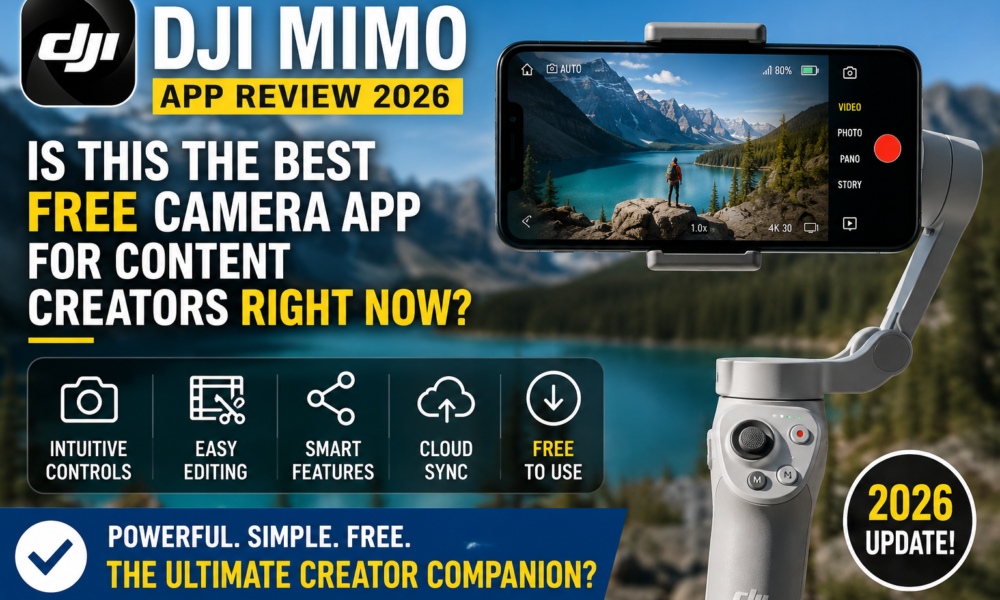
DJI Mimo App Review 2026: Is This the Best Free Camera App for Content Creators Right Now?
By: Tech & Gear Editorial | Updated: May 2026 | Reading Time: ~6 min If you own a DJI Osmo, Pocket, or Action camera, you already know that the hardware is only half the story. The real magic —...

By: Tech & Gear Editorial | Updated: May 2026 | Reading Time: ~6 min
Table Of Content
If you own a DJI Osmo, Pocket, or Action camera, you already know that the hardware is only half the story. The real magic — or frustration — lives inside the DJI Mimo app. In 2026, Mimo has evolved into something far more capable than the basic companion app it started as. But is it finally good enough to be your all-in-one creation tool? We went hands-on with the latest version to give you the most complete DJI Mimo review you’ll find this year.
Table of Contents
What Is DJI Mimo?
DJI Mimo is the official, free companion app for DJI’s entire handheld lineup. It connects wirelessly via Bluetooth or Wi-Fi to devices including the Osmo Pocket 3, Osmo Action 6, Osmo Action 5 Pro, Osmo Mobile 7, Osmo Mobile 7P, Osmo 360, and DJI Mic series. Available on both iOS and Android, it serves as your camera remote, live preview monitor, and full-featured video editor — all in one place.
The app is free to download and use, which makes it a genuinely compelling proposition for anyone investing in DJI gear.
What’s New in DJI Mimo in 2026?
The biggest leap for Mimo this year has come in a series of updates that collectively transform it from a capable companion tool into a near-complete creative suite.
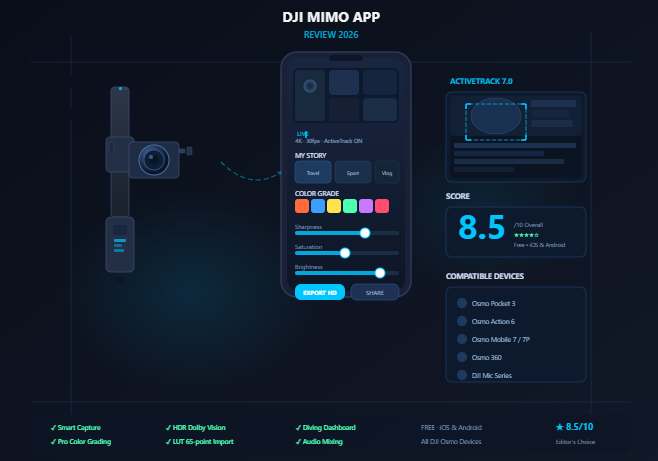
Smart Capture & ActiveTrack 7.0 are among the headline upgrades. In multi-subject scenes, the app now displays multiple focus areas simultaneously, letting you tap to activate tracking on any individual — and tap again to seamlessly switch between subjects. This works remarkably well for creators shooting sports, group content, or anything involving movement.
Pro Color Grading is another major addition. Accessed through the Album section, creators can now apply seasonal filter presets — Spring Pro, Summer Pro, Autumn Pro, and more — giving footage a cinematic finish with a single tap. For Osmo 360 and Osmo Action 6 users shooting in FilmTone mode, an exclusive “Platinum Film” watermark unlocks at export, adding a professional cinematic identity to your content.
Dont Miss : This Powerful AI Watch Detects Health Risks Early
The HDR Dolby Vision mode is a quiet but impactful update. With one tap, footage is upgraded to a richer, true-to-life color experience that looks stunning on modern displays — a feature that was previously the domain of dedicated editing software.
Enhanced LUT import now supports the 65-point LUT format and integrates across One-Tap Edit, 360° video editing, and more — giving colorists and serious creators a real professional workflow right on their phones.
For underwater adventurers, the Diving Dashboard upgrade adds a depth curve and max depth gauge, displaying dive data dynamically throughout the clip. It’s a niche but thoughtful feature that shows DJI is listening to its community.
Perhaps most practically, audio mixing for the Osmo Action 6 is now supported: when an external microphone is connected, you can adjust the external mic and body audio levels independently — something that was previously impossible inside the app.
Core Features That Still Shine
Beyond the new additions, Mimo’s existing toolkit remains impressive for a free app:
- My Story Templates: Professionally designed video templates let you assemble polished short films with a single tap. The app uses intelligent scene analysis to identify highlights, applies transitions, music, and pacing automatically.
- Real-Time Beautify Mode: Precise face detection enhances skin tone, smooths textures, and adjusts lighting in real time during recording — helpful for vloggers and selfie creators.
- Full Manual Controls: Brightness, saturation, contrast, color temperature, vignette, and sharpness are all adjustable before and during shooting.
- Advanced Editing Suite: Trim, split, speed ramp, reverse, add subtitles, stickers, transitions, and animations — the editor has matured considerably. Speech-to-text subtitle generation and multi-resolution export round out a genuinely capable toolset.
- 4K Live Preview: HD live view during recording keeps you fully in control of framing without having to guess from the camera’s tiny screen.
- Timelapse & Motionlapse: These remain some of the most satisfying creative tools in the app — set your parameters and walk away.
What Still Needs Work
No review is complete without honest criticism, and Mimo does have real limitations.
The most frequently cited issue remains connectivity stability. Some users — particularly on newer Android devices — report occasional crashes or dropped connections during extended sessions. For a workflow tool, reliability is non-negotiable, and DJI still has room to improve here.
4K 60fps shoots with EIS disabled inside the app is a known trade-off. For buttery-slow motion and maximum quality, some power users still route through the native camera app and rely on the gimbal alone, losing access to features like ActiveTrack in the process.
The editing tools, while good, aren’t a replacement for desktop software like DaVinci Resolve or Adobe Premiere for complex projects. This isn’t a failure so much as a realistic expectation-setter: Mimo is a mobile-first tool designed for speed, not precision multi-track editing.
Finally, certain advanced features remain exclusive to newer DJI hardware. If you’re running an older Osmo model, your Mimo experience will be more limited — a natural but occasionally frustrating ecosystem constraint.
Who Is DJI Mimo For?
DJI Mimo is built for content creators who want to go from shooting to sharing fast. Travel vloggers, outdoor adventurers, social media creators, and hobbyist filmmakers will find enormous value in the app. Its intelligent automation — Smart Capture, My Story, One-Tap Edit — dramatically lowers the barrier between raw footage and finished content.
For professionals seeking granular color work, multi-track audio mixing, or complex timelines, Mimo works best as a field tool for capture and rough assembly, with final polish happening in dedicated software.
Final Verdict: DJI Mimo Review 2026
Score: 8.5 / 10
DJI Mimo in 2026 is the best version of itself yet. The combination of Smart Capture, Pro Color Grading, HDR Dolby Vision, enhanced LUT support, and improved audio tools makes it a genuinely powerful mobile creation platform — and it’s completely free. The occasional stability hiccup and hardware-gated features keep it from a perfect score, but for DJI device owners, it remains absolutely essential.
If you’re already in the DJI ecosystem, update your app today. If you’re on the fence about which action camera or gimbal to buy, Mimo’s depth and polish is a genuine differentiator in DJI’s favor.
DJI Mimo is free to download on the App Store and Google Play Store. Compatible with Osmo Pocket, Osmo Action, Osmo Mobile, Osmo 360, and DJI Mic series devices.
Dont miss : America’s Phones Just Got Smarter Than Humans — And It’s Scary





[…] 18, 2026 7 Powerful AI Tools That Can Save You 10+ Hours Every Single Week September 18, 2026 DJI Mimo App Review 2026: Is This the Best Free Camera App for Content Creators Right Now? September 18, 2026 This Powerful AI Watch Detects Health Risks Early […]